
CASE STUDY · FINTECH · 6 MIN READ
TAKING A BANK’S BUSINESS-LOAN APPLICATION FULLY DIGITAL
Mobile and desktop onboarding for MSME business loans — from a link in an SMS to an e-signed application — designed in a month and now live.
ROLE
Sole product designer
TIMELINE
1 month · 4 sprints
PLATFORM
Mobile web · Desktop · RM dashboard
STATUS
Live in production · Client under NDA
SOME OVERVIEW
Key point
A loan application is not an account opening. It needs the business too: registration, bank statements, existing loans, guarantors, declarations, a fee and a signature from everyone involved.
THE ASK
Problem statement
The journey had to work for three kinds of people, each with a different amount of patience and context.

Two more people sit around that journey: guarantors, who never started the application but must verify and sign, and relationship managers (RMs), who follow every application and ask for corrections.
KICKOFF
Every step came with a rule
The kickoff handed me the journey as a list of integrations. Each one had a constraint the applicant would feel.
One OTP, two places
First 3 digits to the mobile, last 3 to email.
Two IDs, two patterns
Aadhaar needs an OTP; PAN is verified silently.
PDFs, but not those PDFs
Statements are uploaded by hand; password-protected files are rejected.
Prove you’re here
A live selfie with time and location, for fraud prevention.
Guarantors aren’t applicants
They join from their own link, only to verify and sign.
Nothing counts until everyone signs
The application reaches the bank in one push, after the last eSign.
GETTING TO WORK
Three principles
Before drawing screens, I wrote down three rules every step had to pass.
01
Ready before you start.
Tell people every document they’ll need before step one, so nobody stalls halfway.
02
Verify once, never retype.
Every verified source fills in fields the applicant would otherwise type.
03
Every section fixable.
Applicants and RMs work section by section, so one mistake never means starting again.
WHAT SHIPPED
The final product
One code, two places
The split OTP was the step most likely to confuse people. Two screens would have suggested two codes, so I kept it to one: six boxes in two groups of three, with a gap where the code splits. The line above says exactly where each half went.
Split OTP — one code, the split made visible · Aadhaar — grouped 4-4-4, numeric keypad
Verified, not typed
Once the business is verified, its details arrive on their own. Those fields come pre-filled and locked: the bank already trusts that data, and the applicant doesn’t type it again. A “same as office address” checkbox removes the next round of retyping.
Key point
Trade-off: a locked field can’t be corrected in place. If the source is wrong, it’s fixed at the source — so the screen explains that instead of offering an edit button.

Business details — fetched fields locked; uploads show name, size and status
Proof of presence, and a separate door for guarantors
The live selfie is a fraud check, but to the applicant it’s a camera opening without warning. The frame guides the face and the step tracker stays in view, so even this step shows how far you’ve come.
The applicant enters each guarantor’s details. The guarantor then gets a separate link with a much shorter job: verify and sign — instead of scrolling past someone else’s business.
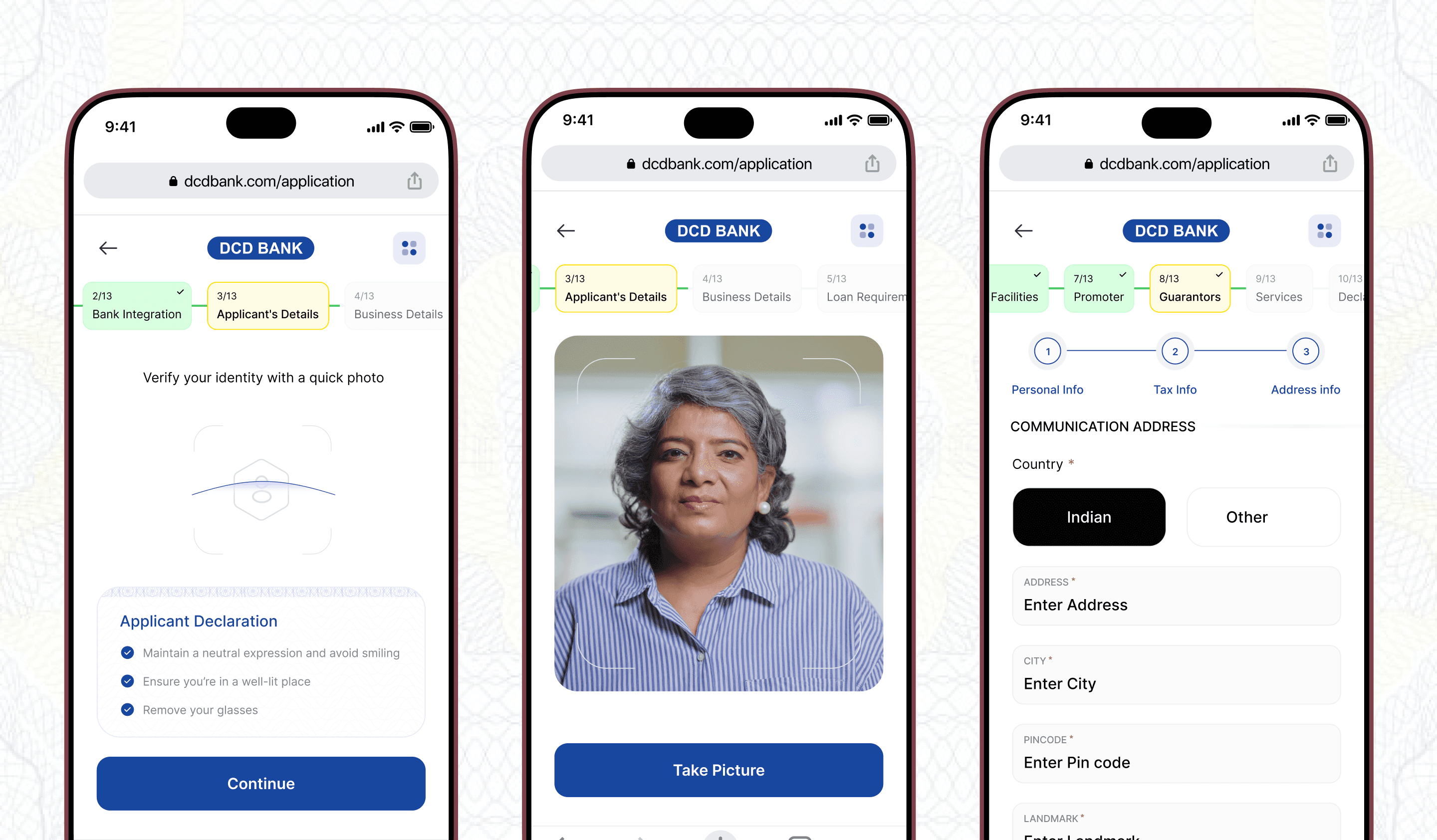
Liveness check — tracker stays visible · Guarantor — added by the applicant, completed from their own link
The review screen is a repair tool
By the end, the application holds around twenty sections. The review screen opens with a summary — loan amount, applicant, business, tenure — then lists every section with a status. Done sections show a tick; one that needs attention is flagged amber, one tap from being fixed.
Key point
The same section-by-section structure is what lets an RM send back one section for correction, instead of the whole application.

Review — summary on top, every section with its status · Success — a reference number the applicant can quote
It grew from nine steps to thirteen
The first version grouped the journey into nine steps. As later sprints added sections, the tracker grew to thirteen. What didn’t change was the counter: every screen still says which step you’re on, out of how many, so a longer journey never feels open-ended.
BEHIND THE SCREEN
One application, three people
The applicant follows one path. The guarantor and the RM join it from the side.

APPLICANT
1 · Link
— by SMS or email from Apply Now
2 · Verify
— split OTP, Aadhaar, PAN
3 · Business and bank
— registration fetch, statements, selfie
4 · Loan and guarantors
— requirements, guarantors, declarations
5 · Fee
— by UPI
6 · Review and eSign
— every signatory
Submitted
— reference number issued, one push to the bank
SIDE JOURNEYS
Guarantor
Gets their own link at step 4. Verifies with Aadhaar and signs before step 6 can finish.
Relationship manager
Sees every application live — pending, completed or awaiting resubmission — and can send one section back.
No RM ID?
The lead stays on the existing call-centre route.
SO, DID IT WORK?
Impact
1 MONTH
kickoff to handoff
LIVE
in production
2
platforms: mobile web and desktop
3
user types served
The bank keeps its performance data in-house, so I can’t show completion rates. What I can show is what shipped: a regulated, multi-party loan journey, designed in a month and now the bank’s digital route for business-loan applications.
It’s also built to be measured. Every section reports its own status, so completion, time to submit and resubmissions can all be tracked step by step.
LOOKING BACK
Pausing to reflect
This was a month-long project with almost no room to iterate after handoff. Working alone meant every decision was mine to defend, which pushed me to write down the why behind each one.
If I started again, I’d push for an hour with real business owners on the split OTP and the statement upload — the two steps I’d expect people to stumble on, and the two I designed without watching anyone use them.
NEXT: HR OPAL DESIGN SYSTEM — COMING SOON